
Lesson 2 is about reviewing the CEOs whom your members are connected to already on LinkedIn.
Assuming that you’ve processed your address book into LinkedIn, now it’s time to start seeing which of your existing members might know potential prospects that are CEOs, Presidents, Entrepreneurs, Owners, Founders (and for some unknown reason - they've not yet provided a referral).
You should also be looking at your members' connections for Trusted Advisers that are in a position of influence in your local community and whose primary contact/relationship is at the CEO level. We'll review how your Trusted Adviser's can also be a great source of CEOs.
Begin to systematically go through your members' connections for whom they know. If you see someone’s title that interests you, click on their profile to check them out. Unfortunately, Linkedin forces you to do this one-by-one. There is no tool yet to filter a contact's connection list. This is why I made the suggestion in our last lesson to do about 10 every day as you move through all your contacts' connections.
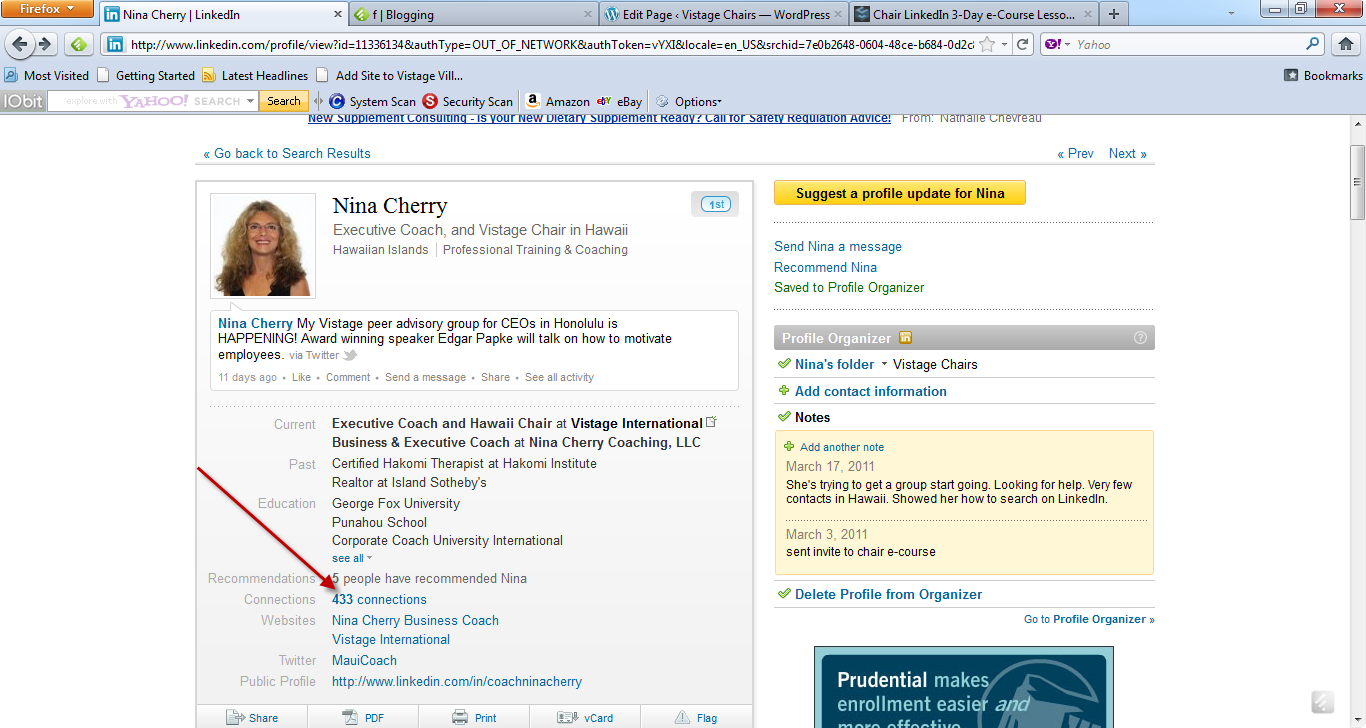
The first step is to go to each of your member's profiles and click on their connections. In the screen shot below you'll see the connections link on Nina Cherry's Profile.
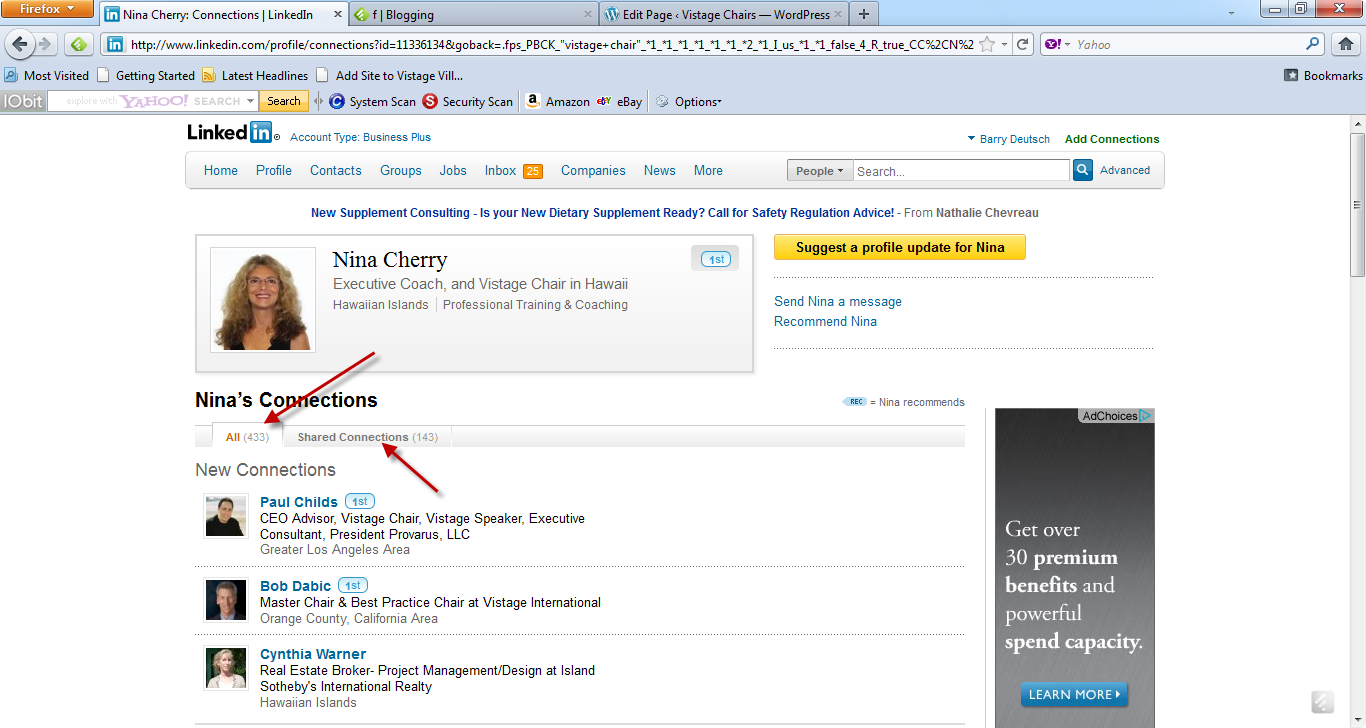
Once you click the connections link, now you'll notice one or two links to view your member's connections. If your member has not set their privacy setting too high and they enable all their contacts to view all their connections, you'll see one tab for "All" and one for "Shared Connections". They Shared Connections tab are those connections the two of you share in common. If your member has set a restrictive level to their connections, you'll only see the option for "Shared Connections."
Begin to systematically go through your members' connections for whom they know. If you see someone’s title that interests you, click on their profile to check them out. Unfortunately, Linkedin forces you to do this one-by-one. There is no tool yet to filter a contact's connection list. This is why I made the suggestion in our last lesson to do about 10 every day as you move through all your contacts' connections.
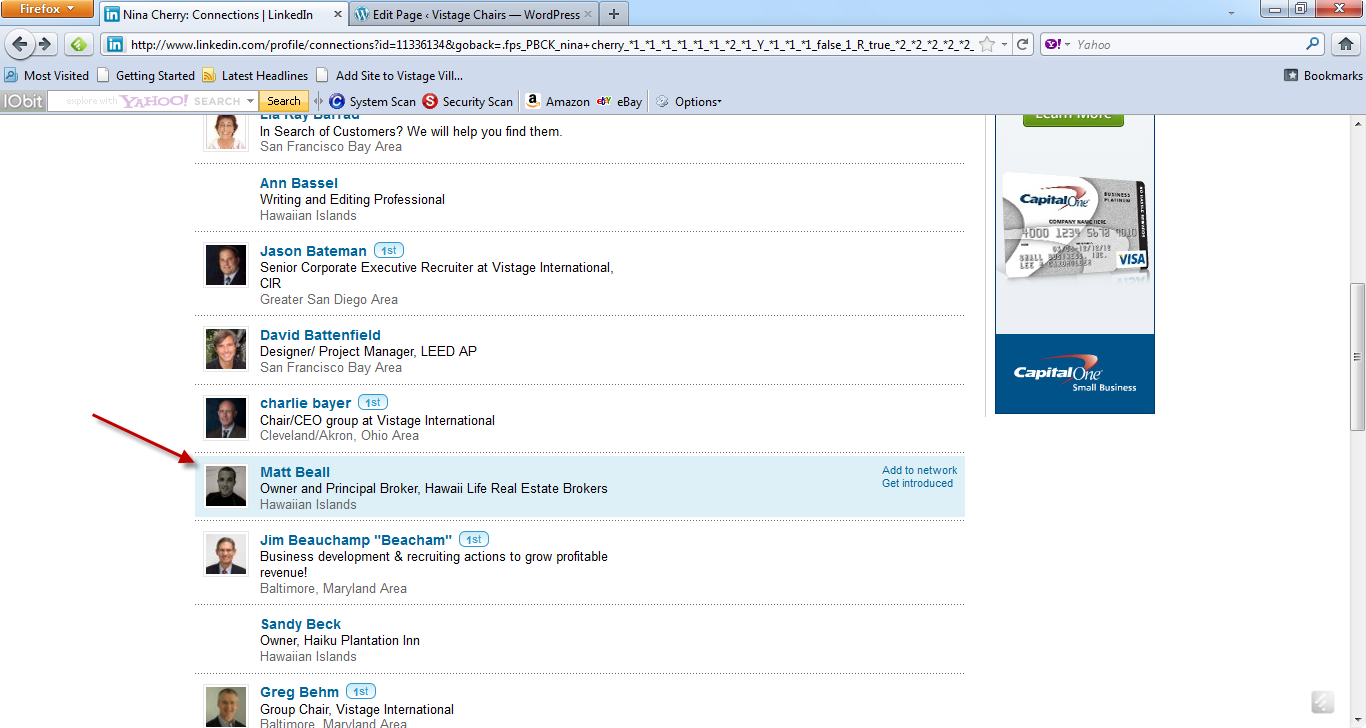
Here's an example of a potential CEO member listed as one of the contacts on Nina Cherry's list of contacts. Our next step might be to click on the person's name, read about their background to validate they are worthy of a follow-up, and look at how you're connected to them? In this specific example, I would see that Matt is connected to Nina. I might call or email Nina and ask her if she would be open to providing an introduction.
Is this someone you would like to be introduced to and get to know – someone who might either be an immediate CEO prospect or a stepping stone to a prospect through a one-degree connection, such as High Level Retained Executive Recruiters (like yours truly), High level Bankers, CPA Managing Partners, Senior Partners of Business Legal/Employment Law Practices, and so on. Each one of these high potential leads need to be sent an invitation, tracked to see how/when they respond, and what previous communication you've had with this individual.
Tracking/Managing Your LinkedIn Contacts
I assume you’ve upgraded your LinkedIn accounts to the Business Pro Version. If not, you should upgrade to Business Pro from the free version. Once you click on the profile of someone you would like to know better, add them to a “bucket” or “category” in your profile organizer on LinkedIn (see the screenshot below). The Business Pro Version gives you access to the "Profile Organizer" which as both a category and tagging feature.
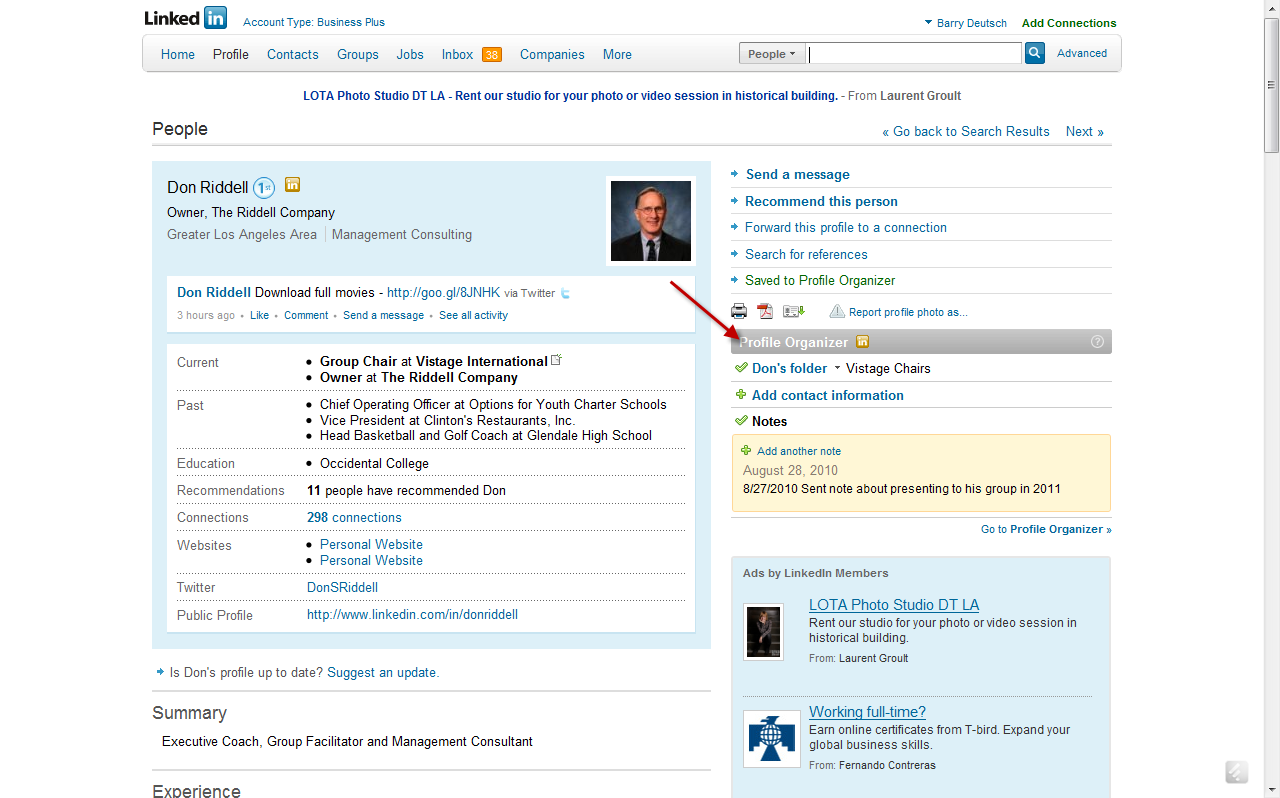
You can keep notes on the person – when you contacted them, next steps, etc. Once you’re a first degree connection, LinkedIn opens up a tagging dialogue box where you can further refine your categories (there is a limit on the number of categories you can have – I think it’s 15). My analogy is that the categories are the titles of the file drawers and the tags are individual folders. You can put someone in one or more categories and in one or more tags.
Doing this allows you to sort/refine/cut/slice/dice your prospecting list right within the LinkedIn Application.
In my Executive Search Practice, when I identify a potential candidate (regardless of whether I am connected at a 1st, 2nd, or 3rd degree level), I put them in a major category. I have "categories" for every search project I am working on. I enter notes in the notes field about how I found the person, what I sent them as a note, and what is the the next follow-up step. Once they accept my invitation, I then "tag" them into further sub-classification, such as Ideal Candidate, Well Connected, Not Viable. You'll obviously have your own "filing system". I have found this one feature - the Profile Organizer - available through Business Pro Accounts to be the most valuable feature of LinkedIn - well worth the $50/mo. price.
We'll get into more detail on the use of the Profile Organizer and Tagging feature in our Advanced Program on Social Media Management Tools.
Invitations to Connect
Now that you’ve categorized and added this prospect to outlook or whatever contact manager you use (act, goldmine, salesforce.com), now we have to reach out and connect. There are a few of options for connecting to new prospects:
1. Send an invitation to connect to you. If you don’t have some connection basis – worked at the same companies, friend, did business together at one point, you’ll need an email address to send them the connection notice. In this message you could reference the relationship with your existing contact.
LinkedIn does a great job of minimizing spam. Be careful of sending invites to people, claiming you have a prior relationship (friend, co-worker, business deal) where there is none. If a few people tattle-tale on you as sending spam, then LinkedIn will force you to use an email address for every invite you send out. They tattle-tale on you by checking the box on the invitation request as “I don’t know this person”.
If you have the person’s email address and send them an invite, LinkedIn will always consider this an appropriate invitation request and NOT spam.
I find about 80% of the email addresses I need to send invitation requests either by Googling the person or using Jigsaw.com to look them up.
2. Use the Inmail to send an invite. Unfortunately, Inmail has a bad rap within the LinkedIn Community. Many consider it spammy. However, I’ve talked to a few chairs who have had great success in sending inmails as an introduction. LinkedIn only gives you a limited number of these inmails on a monthly basis. Again, the concept is to control unsolicited requests and notes.
3. Send a request through your contact (member, TA, Speaker) to be “introduced” to this “person of interest”. Let the contact you have facilitate the introduction by forwarding an introduction/networking invite with their approval/note”.
The introduction note might go like this:
“Bob, Attached is a note from a good friend of mine and one of the most respected CEO coaches in Vancouver. John would like an opportunity to invite you to join his network and perhaps begin to get to know each other. I can’t say enough good things about John. He’ll become one of your most powerful connections within the Vancouver business community.”
I would recommend setting aside some time each day (maybe 15-20 minutes) and starting to systematically go through the connections for every single one of your contacts on LinkedIn. It might take you 90-120 days (or more) to plow through all of them if you have a lot of LinkedIn contacts. Going through your members connections as a first step might take a few hours - depending on how many connections each member has.
Lesson 2 Action Items
1. Review each connection for each one of your members
2. Upgrade to the Business Pro Version of LinkedIn
3. Force yourself to spend time every day for a few minutes going through your members' connections (and larger 1st degree network connections)
Lesson 2 Discussion Points
1. Have you ever provided an introduction for someone on LinkedIn?
2. Have you ever asked for an introduction on LinkedIn?
3. What has been your most successful technique for inviting people to join your network on LinkedIn?
4. What level of depth/diligence have you applied so far in looking at the connections of your contacts?
5. It’s been my experience that you need roughly 1000 local contacts that are high level contacts (CEO level and TAs working at the CEO level) before your network begins to pump out on an almost self-sustaining basis an abundant level of referrals and leads. This is NOT your total number of contacts – it’s your “A” list of contacts that are either directly CEO prospects or could you lead you to one through one-degree of separation.
Where do you stand in this effort to build a strong local network on LinkedIn?