
Lesson 10 is a research project to look for relevant groups to join on LinkedIn. One of the most powerful elements of LinkedIn is the groups. You can find groups for your alumni association, your geographic area, job level (CEO/CXO), or type of company/industry such as Industrial Sign Vendors.
Remember the old adage "birds of a feather flock together". LinkedIn takes that old adage and multiplies the leverage of discovering people in groups that want to be in groups with others like themselves.
You can belong up to 50 groups. You’ll probably not reach that total, but you might want to consider joining groups of 1000 or more members as a threshold or selection criteria. You might want to start with local groups that are unique to your geographic area since those might yield the best results.
Your second strategy might be to look in large groups and search for members specifically in your geographic area. You might need to join and drop from several groups to do this.
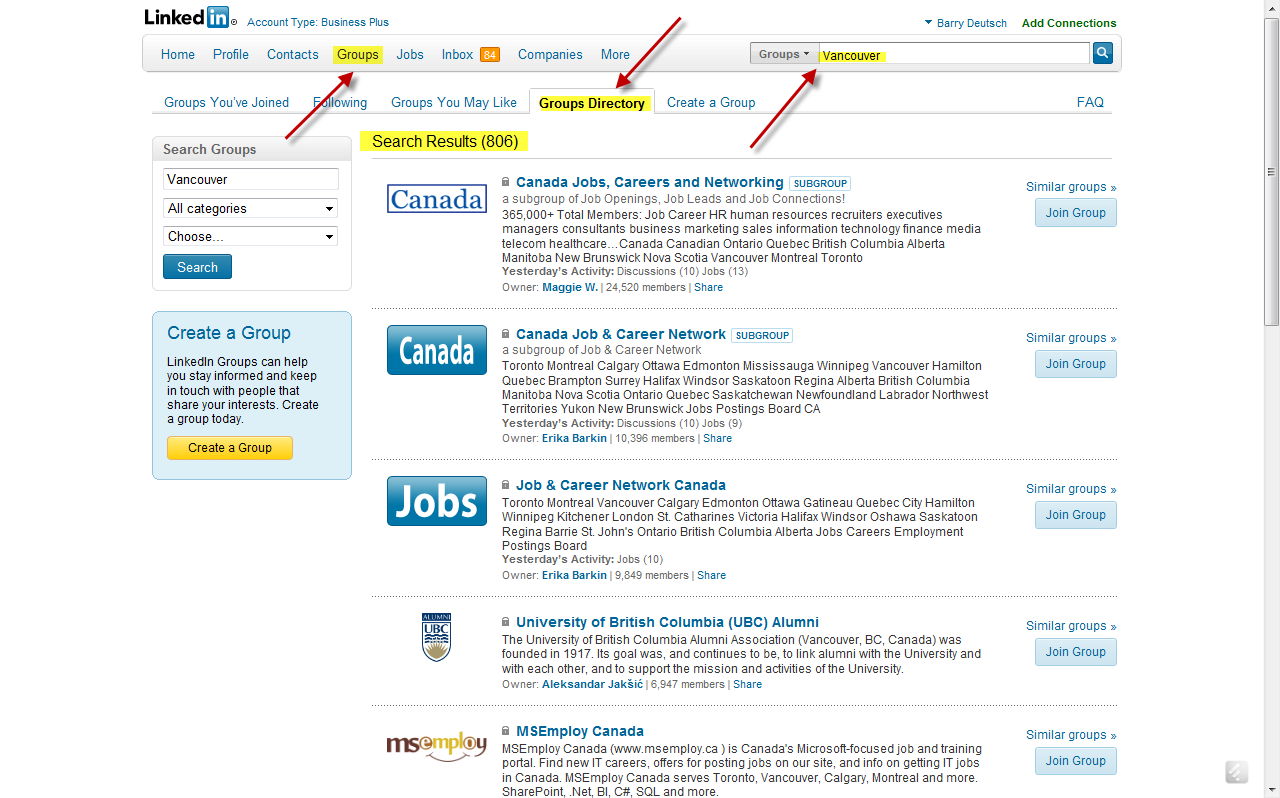
Below is screen shot of the Groups Menu and Search Box. You would first click on groups on your top menu, then click the groups directory tab, and then enter a selection into the search window. In this example, I entered Vancouver. Back came over 800 groups. I would want to scan through those for the most likely groups which would contain CEOs directly and indirectly TAs who would know CEOs.
Another example: I belong to the Construction Professionals Group. The total membership is in excess of 13,000 members. When I search in the group on the term “Vancouver” for LinkedIn members that have that term on their profiles, 37 hits come back.
In the group CXO Community which has over 42,000 members, 78 show up as being in Vancouver.
I can reach out to the appropriate members and send an email to any group member without the issue of having to use inmails, be considered spam, or having to look up their email address.
As an example, take a look at the groups to which I belong and to which my partner Brad Remillard belongs. We tend to add/drop groups depending on our executive projects and the need to jump into a particular industry segment.
Take a look at the profiles of the CEOs/TAs whom you have a 1st Degree Connection. What groups do they belong to? Which of the groups you might choose are industry/trade related like Construction, local/community related like Vancouver CXOs, alumni, topical (Social media, Finance, Strategic Planning, Coaching, etc.), or civic/non-profit?
Everyone in this course for example is a member of our Chair Discussion Group on LinkedIn for Leveraging Social Media.
Lesson 10 Action Step
Join at least 5 groups in your local community that might have potential CEO prospects OR Trusted Advisers as members.
Lesson 10 Discussion Topics
- Which groups do you belong to now?
- Have you connected to anyone in those groups or joined in any conversations/discussions?
- Have you searched through the membership of any of these groups for appropriate TAs or members in your geographic area?