Xobni for Outlook - Must Have Tool

Xobni Screenshot

Xobni Screenshot

If you use Outlook, the Xobni Extension/Add-on is a wonderful tool. In fact, it's could be the best tool I have ever downloaded.

Have you tried it yet? Xobni is Inbox spelled backwards.

Get the paid version instead of the free version.

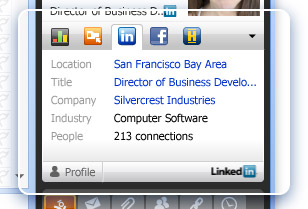
When it comes to networking, this little add-on is so powerful. Everytime you highlight a message, it will show whether your contact is on facebook and/or LinkedIn. It also will allow to send an immediate invitation to connect.

In addition, you can see your entire history of communication with that contact - even in archived files. Best yet - the search capability of finding your contacts for auto-completion of the email address when sending email is worth the small investment compared to the time savings of looking people up in your address book.

Try it - if you're a Outlook Power User - you'll love this tool.

And they just came out with a version for the Blackberry which I'm about to try out.

I'm NOT A Writer Syndrome - Is This Your Excuse?

Can I Blog If I'm NOT a writer?

Can I Blog If I'm NOT a writer?

In a recent guest post on Problogger, one of the featured feeds under our blogging tab, Mark Hayward talks about the need for small business owners (Vistage Chairs and Members) to start blogging even though they don't see themselves as "writers on web".

I love the phrase Mark coins in his article "IMNOTAWRITER Syndrome" to describe the fear factor many business owners (Vistage Chairs)  face in starting to blog as a vehicle for building their brand and driving people who are in need of their services or products.

You've heard me say it a hundred times.

Every web marketing study confirms it.

Blogging is the most effective method of traffic generation, personal branding, web-based marketing you could be using.

So - why are you not yet taking advantage of blogging?

Have you considered the three levels of blogging:

  1. Guest Blog on another blog to get your feet wet - would you like to try out guest blogging on our Vistage Leadership Community Blog? Requires no amount of technical knowledge and very little time.
  2. Host your blog on one of the major blogging platforms like WordPress.com or Blogger. Requires a moderate amount of technical knowledge and time to do effectively.
  3. Obtain your own domain and self-host your own blog. Requires a lot of technical knowledge, time, and financial investment to maintain and manage.

Which one will you choose?

At some level, you should begin immediately to start blogging.

Don't be left behind in the coming wave of social media - including the primary activity of blogging. Don't allow other business coaches in your local community to rob you of potential group members because you're using the excuse of "IMNOTAWRITER Syndrome."

Don't forget to join our LinkedIn Vistage Chair ONLY Discussion Group, where you can discuss blogging, social media marketing, and other elements of building a strong personal brand for attracting members.

What Should You Blog About?

Pick Your Niche - What will you Blog About?

Pick Your Blogging Niche

We've beaten to death the idea of blogging as a valuable tool in erecting "sign posts" on the Web to guide people to you.

I'll continue to beat this drum until you're sick and tired of hiring it.

Why would I do this?

All Social Media studies and research now indicate that the most viable form of business marketing is blogging. No other social media strategy comes remotely close. So, let's assume I'm no longer trying to convince you to blog, but rather you've taken a leap of faith on my advice and you've either set up your own blog or you are guest blogging.

What do you write about?

I recommend a very focused niche to attract CEOs, presidents, and company owners.

Darren Rowse, who publishes a blog on blogging called ProBlogger (and is one of our featured bloggers in the tab on blogging) says this much better than I can. In a recent blog article titled "Choose a Niche For Your Blog", Darren says:

In the end this is about relevance – people seem to be drawn to niche focused blogs because they know that they’ll see content on them that focuses upon the things they are specifically interested in

How specifically have you defined your Niche?

When your Members go searching for information on a particular leadership or management topic, what do they search on, how do they find great content, and what technique do they use to get to this content?

As examples, see our two niche focused blogs on Career Management and Job Search and Hiring and Retaining Top Talent.

If the thought of setting up your own blog is slightly overwhelming right now, send us a note on our contact form if you would like to be a guest blogger on our Vistage Leadership Community Blog that is launching next week. We're going to build a blog around the very best "leadership" content on the web, and this could be a vehicle for providing you with a platform for putting "your toe in the water" to try out blogging.

Barry Deutsch


Are You Putting Up Sign Posts in Social Media?

Metaphor of posting signs to lead people to you in social media

Metaphor of Social Media Sign Posts

A common phrase used in social media marketing is "erecting sign posts".

You're "directing" and "leading" your prospects to you through all the sign posts you've put up on the Web.

The idea is to create profiles and content that guides your prospects over time to like you, to trust you, to want to follow you. They begin to enjoy your voice, your approach, your useful ideas, comments, suggestions, recommendations.

Over time they begin to trust that the information you provide is not blatantly self-serving, but rather is valuable to the community you've built.

Allow me to give an example:

Brad and I have created a web business of digital informational products aimed at two different markets - executive job seekers and executives/managers hiring top talent. Through a couple of hours a day of work, we are now driving 3000 people a day to our site, we're generating a massive list of individuals interested in follow-up and interaction, and we're beginning to see a decent revenue stream. Our goal is to build this to 10,000 per day within 6 months and 100,000 per day within 12 months.

Brad and I have spent 6 months erecting "sign posts", including doing a one hour internet radio program per week, and then sending that into iTunes and repurposing it for YouTube. We blog regularly and repurpose that content into articles. We feed our content into LinkedIn, other blog distribution sites, and Facebook. We have emails that automatically go out in various sequences to those who've given us permission to communicate.

What's the result? We've built a business with very little investment that is already starting to generate decent financial results. We're doing it on an international level in a broad market like job search or hiring. In just 6 short months, we've established ourselves as one of the dominant authority sites in those two niches.

Here's the best news: these concepts are even more valuable and easier to implement in a local market, such as the niche of CEOs and Presidents needing business advice and coaching that you might be focusing on as a Chair.

In future posts, we'll explore how to create these "sign posts" in your local market, whether it be Lancaster, PA or Fontana, CA.

What are you doing right now to create these sign posts on the Web that point back to you in your local market?

Barry Deutsch

Don't forget to join our Chair ONLY Discussion Group on LinkedIn where we talk about "sign posts" and other techniques of leveraging social media as Chair.

Photo courtesy of jtuason

Become a Resource To Others In Your Network FIRST

Be a Resource to Your Network

Be a Resource to Your Network

Jason Jacobsohn, writing on his blog, Networking Insights, one of our featured feeds on the Networking Tab, talks about a powerful networking strategy of becoming a resource to your network. The title of his article is "Become a Resource to Grow Your Network".

Jason makes the case for helping others BEFORE THEY ASK to become a focal point within your network. This is a major leap that most networkers don't get or are unwilling to accept. If you want to be seen as someone in your network that others go out of their way to help, make referrals, work your referrals for you, and generally populate your pipeline with turned-on excited prospects, you've got to go above and beyond the call of duty in proactively helping others before they ask you for help.

The term I use for these people are "connectors". They naturally put people together in their networks.

When was the last time you did this without being asked?

How often do you do it?

How do you determine if someone in your network requires help from you?

Everyone complains that their network is not giving them enough referrals for potential members. Perhaps, it's time to step back and revisit one of the basic tenets of effective networking:

You must be a giver before a taker. You must give and give and give. I guarantee it will ultimately come back to you beyond your imagination. However, like many things in life, most give up early and don't want to do the hard work required to turn their network into a referral machine.

Barry Deutsch

Goal Setting for Finding Members

The importance of setting goals to hit targets

Set Goals to Hit Targets

A recent blog posting from the tabbed section on Personal Branding reminds us of the process of goal-setting. Heather Huhman, speaks to the idea of setting goals. Heather writes as guest blogger on the Personal Branding Blog, one of my favorite blogs in the unique space of Personal Branding.

Even someone as focused and driven as myself, occassionally forgets to set and monitor goals - I know that's really hard to believe about Barry Deutsch.

Do you have specific goals?

Do you want 18 members at the end of the year vs. the 12 you have now?

Do you have to identify 24 potential members through networking outside of your group referrals to hit that number?

Are you a diligent goal-setter or do you just let it be - and whatever happens will happen - doesn't matter if you get 12,13, or 22?

If you remember the Vistage Chair presentation I may have given to your group, we talked a lot about goal setting and metrics/activities to monitor if you're on track.

Do you treat the size of your group (business) like a real business or is it more of a hobby?

Tell me about your goals and the metrics/activities you track to determine if you're staying on target.

Barry Deutsch

Don't forget to join our Vistage Chair ONLY Discussion Group on LinkedIn where you can participate in a dialogue about how to leverage social media and networking to find and acquire members for your group.

Upcoming Downloads of Tools for Vistage Chairs

Tool Chest full of useful tools for Vistage Chairs to use in finding and acquiring new members

I will be making all my documents and tools used in the Vistage Chair Group Presentation available for downloading on this portal site. These tools include:

1. Trusted Advisor Assessment and Interview

2. The Entire PowerPoint Presentation

3. Audio Recording of the Chair Group Presentation

4. White Paper on why your members should join LinkedIn and Input their entire rolodex

5. 8-Point Matrix for Self-Assessment of your LinkedIn Profile

6. 8-Point Matrix for Self-Assessment of your Networking Tactics

7. 8-Point Matrix for Self-Assessment of your Personal Branding

8. Checklist of Predictive Factors of Member Turnover

9. Trusted Advisor Networking Worksheet

10. Trusted Advisor Target Worksheet

I am also working on a few other tools that might help in your networking, personal branding, social media adventures. Things like the Daily Dozen Social Media Activities Checklist, How to Start Blogging White Paper, and Step-by-Step instructions for identifying potential members on LinkedIn.

I hope to start making these tools available for downloading within the next week.

Barry Deutsch

What Are Those Buttons At the Bottom of Each Blog Post?

Social Media Buttons to Share Outstanding Information

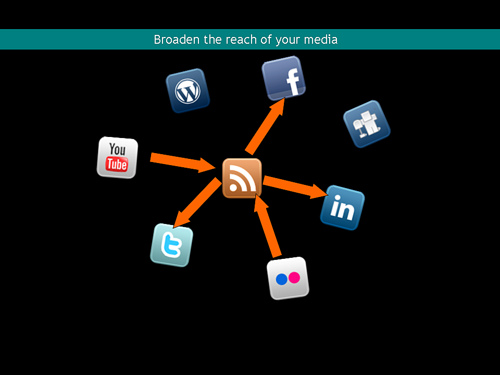
Social Media Buttons for Sharing Information

At the bottom of each blog post are a series of little icons that enable you to share various blog posts that you've found particularly useful. Brad, our expert guest bloggers, and I all appreciate your sharing our content with other Vistage Chairs when you read something you thought worthy of sharing.

At a fundamental level - that's the way blogging and social media works. Someone writes a blog post or shares something interesting they found on the Web that has a few good take-away points, you like it, and share it with your friends, associates, acquaintances, the Members of your Group, and other Vistage Chairs.

So, what are these buttons?

Delicious: Delicious is a popular on-line bookmarking site. You can store all your bookmarks here and you can share all your bookmarks with those looking for similar content. Posting your bookmarks on subject matter expert areas is one of the strategies to personally brand YOU. See my list of bookmarks on Delicious as an example. You have be logged into your Delicious Account to post bookmarks.

Facebook: You can share a valuable blog post with your contacts on facebook. Once you click the button, you'll have an opportunity to enter the post into your news feed on facebook. Obviously, you have to be logged into your facebook account for this to work.

Twitter: Twitter is all the rage on the Internet. It is a micro-blogging platform where you can send 140 character mini-messages to those following you. For example, I have almost 7,000 people following me on Twitter around two different categories - executive job search and hiring talent. Many of those individuals join our LinkedIn Discussion Group, download our free materials, and purchase our products/services. Approximately 10% of our web site traffic comes from Twitter.

It's a viral environment where people who like what you have to say repost to their network. It's another form of personal branding and differentiation. You should have a Twitter Account. You can look at my profile and see one of my lists of Vistage Chairs and other Vistage Community Members using Twitter.

The primary way Twitter gets used is to make a statement/ask a question, repost the tweet someone else wrote (called retweeting), and post a link to something you found useful.

Google Bookmarks: This allows you to save interesting articles you find so that you can refer back to them at a later point. For example, if you read the blog postings of one of the feeds on this portal site, you might want to bookmark a particularly interesting blog post.

LinkedIn: This button will allow you to repost the blog article to any of the LinkedIn Groups you participate in. It automatically creates an entry in the news feed of the group. You can select the specific group you would like to post the news item (blog post) into and you can post up to roughly 100 news items into LinkedIn in a 24 hour period.

Email: This button will allow you to forward the link of a blog article you found interesting to someone in your email address book. The system picks up whatever email program is your default - such as outlook.

Barry Deutsch

Graphic courtesy of DavidZimm

Navigation Around the Vistage Chair Portal Site

Navigating around the Vistage Chair Portal Site for Finding New Members

Navigation in the Vistage Chair Portal

In this blog post, I'll describe how to navigate around to some of the key areas on this portal site for Vistage Chairs.

We've already discussed the tabbed content of Best Practices in Finding Members.

At the top along the header you'll see three links for "home", "contact us", "meet the experts", and "why am I here?" These are links on our website that help you to navigate the site and provide additional information.

The home link returns you from any tab of information with blog feeds, such as the personal branding tab, back to the home page of the blog on best practices.

The contact us link provides you with a contact form to send a quick message back to us.

The Meet the Experts Page gives a short background on both Brad and I, and all our guest blogger experts.

The Why Am I Here Page provides a precise reason for reading the blog, using this site as your "portal" site for information, tools, tips, techniques, and discussion on finding new members for your Vistage Group.

At the bottom of every page are 3 columns of information. First, is the Recent Posts column which lists the last 10 recent posts. Second, The featured posts column lists blog articles that we consider to be the best content posted on the blog (check back often since the posts in this column change frequently). Third, a link to our LinkedIn Discussion Group for Vistage Chairs ONLY regarding how to leverage social media and social networking.

On the sidebar (which only appears when you are on the home page/blog article listing), you'll find a search box to locate information based on your search term. Below that you'll find a list of blog articles that are specifically for managing your interaction with this portal, including how to navigate the site, the tabbed structure of content, and how to share information you find useful with other Chairs and your Members.

Moving down the sidebar, you'll see the ability to find articles listed by category, by series, and by tags (hot topics). Below that is a listing of the key pages on our portal site for Vistage Chairs (replicates the links across the top of the screen).

Barry Deutsch

Tabbed Structure of Vistage Chair Portal

Tabbed Organization of Vistage Chair Portal for Finding New Members

Tabbed Vistage Chair Portal

This site is organized in a tabbed structure - much like a series of file folders:

First Tab - FINDING MEMBERS

The first tab is the blog articles written by Barry Deutsch, Brad Remillard, and our distinguished list of experts. These blog articles include original content with tips, suggestions, recommendations, and other ideas. It also features short reviews of other blog articles written by experts outside of Vistage, representing the elite bloggers with expertise in particular subject areas. The blog articles we pick are considered to be outstanding best practices, most of which we have personally implemented and tested.

Second Tab - SM TOOLS

In this tab,we feature the blogs written about the various social media sites and the tools and applications for managing your social media and networking interactions. We'll highlight and review in the FINDING MEMBERS Tab some of the tools we use and consider to be valuable as you expand your social media and networking activities. review all the social media and social networking tools that you might find useful in managing your communication, branding, social networking connections. These might include tools like the MS Outlook Extension Xobni, Plaxo, Gist, Google Analytics, Snag-it, Google Wave, Google Buzz, Google Reader, Firefox Extensions, and many others.

Third Tab - SM NEWS

In this tab, we feature a few blogs that have a very high frequency of publishing, sometimes numerous times throughout the day, that will keep you up-to-date on changes and evolution within the arena of social media and social networking - great tab for news junkies.

Fourth Tab - NETWORKING

In this tab, we feature the blogs written specifically about networking, both on-line and off-line. We also have included some of the blogs specifically focused on LinkedIn since this is the acknowledged go-to site for professional networking. We'll be discussing with high frequency the use of LinkedIn as a core strategy in finding new members.

Fifth Tab -PERSONAL BRANDING

In this tab, we identify those blogs that are focused on to create a powerful personal brand. Creating awareness and differentiation is critical for your long term success. It's much easier to have people "FIND YOU" vs. "FINDING MEMBERS". We've picked the very best bloggers and experts on how to develop and sustain a powerful personal brand in your local community.

Sixth Tab -MARKETING

In this tab, we've brought together some of the best bloggers and experts on marketing on-line, using drip nurturing techniques to build relationships over time, connecting with potential people directly in the "market" for your services. Much of the material is generic. We've tried to focus on some of the blogs/experts who talk more to the issue of personal services marketing/consultant/coach marketing. In addition, we identify some of the blogs aimed at some of the more popular social media "marketing" sites, like Facebook - specifically creating Facebook Fan Pages separate from your personal Facebook account.

Seventh Tab - BLOGGING

Without a question, blogging is one of the most effective marketing vehicles for any business. It should be at the top of the pyramid for all your "marketing" and "personal branding efforts".  Yes - it takes a tremendous amount of time to blog consistently (doesn't do any good if you're doing it inconsistently). Yes - it is a long-term strategy. You're probably NOT going to see an effective leverage from blogging until you've probably written over 100 blog postings. However, even though it takes a tremendous effort to write your own blog, it is, and will continue for years to be, the most effective method to distribute your message, branding, marketing.

We feature blogging tips, techniques, advice from the A-list of bloggers. We also feature a few blogs with the behind-the-scenes technical elements of building and developing a blog - especially using the most popular blogging platform of WordPress.

Use this "portal" for Vistage Chairs as your home base for some of the very best content and best practices on finding members, marketing yourself as a Vistage Chair/Leadership Coach in your local communities, and for creating a powerful personal brand.

Barry Deutsch
Join our

LinkedIn

Discussion Group


Discuss with other Chairs How to Find Members

Back to Top